{duckdb} or {duckplyr}?
I’ve been diving pretty deep into DuckDB. It has shown that it has great utility for the vast majority of mid to large scale data analysis tasks—I’m talking Gigabytes not Petabytes. In particular, Kirill Müller of Cynkra, has been doing great work in bringing DuckDB to the R community.
Today, this takes the form of two R packages:
I think the R community would benefit greatly by adopting DuckDB into their analytic workflows. It can used to make highly performant shiny applications or just speed up your workflow.
For example, here is a demo of a Shiny application filtering, plotting, and visualizing 4.5 million records very quickly!
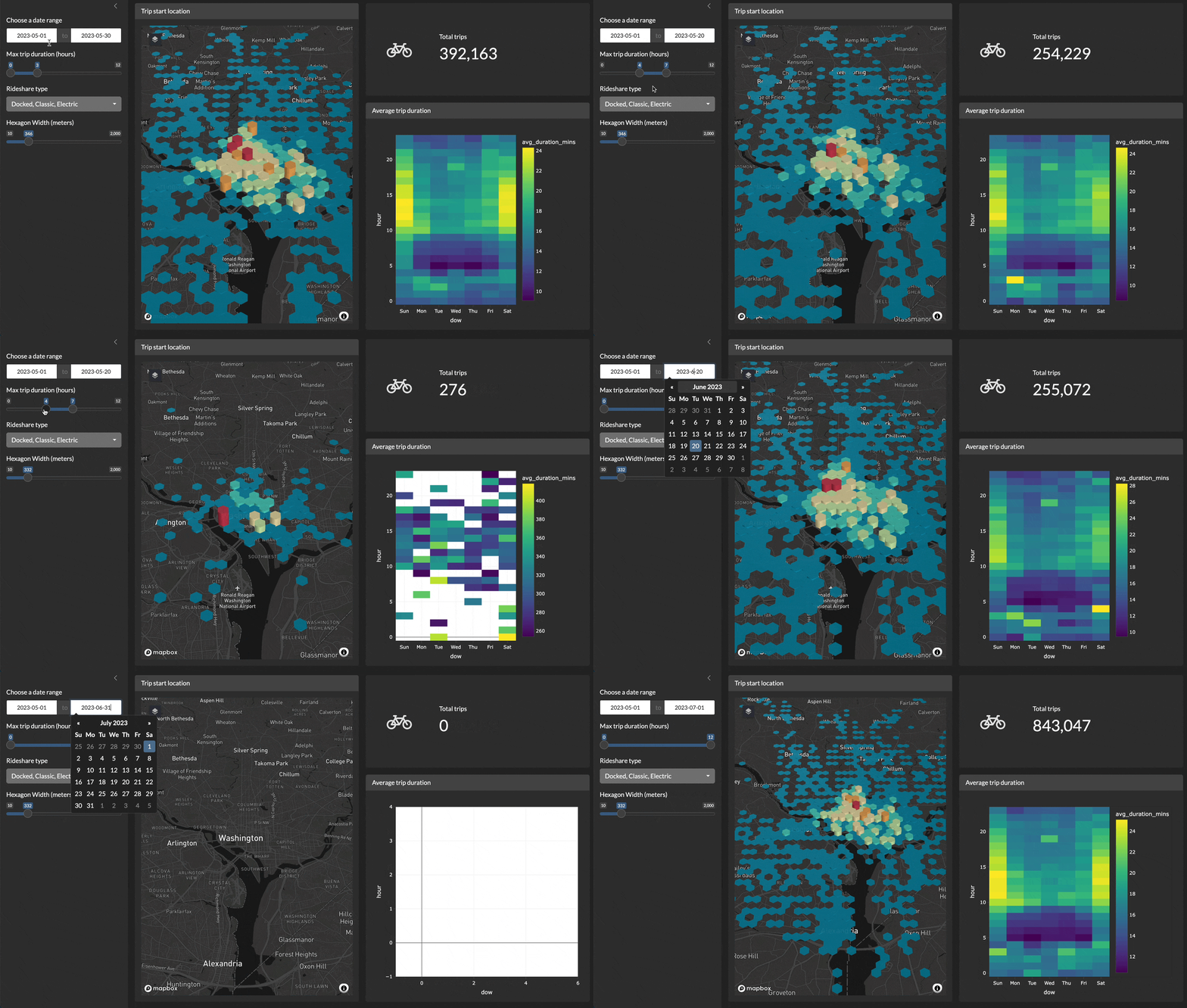
Y’all keep asking me {duckdb} or {duckplyr}
and before I tell you what my answer is, I’ll tell you why I’m bullish on DuckDB. I won’t ramble on details.
Jargon giraffe 🦒: bullish!
Bullish is a term that is associated with a growing stock market. Think of the upward motion of their horns. People who are “bullish” would spend more money in the stock market expecting its prices to continue to rise and thus make more moneyyy 💸💸💸
Why DuckDB?
- Supports larger-than-memory workloads
- Columnar vectorized operations means operating only on the data you need to and more of it and faster!
- Tight Apache Arrow integration!
- Supports Substrait for database agnostic query plans
- Runs in the browser (think ShinyLive + DuckDB means fast compute all running in the browser without a Shiny server)
- _ It is stupid fast_
My verdict?
The thing that is most important, in my opinion, for DuckDBs ability to be useful to the R community is its ability to work on data that is larger than RAM. Read this awesome blog post.
Use
{duckdb}!!!
{duckplyr}
The R package {duckplyr} is a drop in replacement for dplyr.
duckplyr operates only on data.frame objects and, as of today, only
works with in memory data. This means it is limited to the size of your
machine’s RAM.
{duckdb}
{duckdb}, on the other hand, is a
{DBI} extension package.
This means that you can use DBI functions to write standard SQL. But it
also means that you can use use tables in your DuckDB database with
dplyr (via dbplyr).
{duckdb} allows you to write standard dplyr code and create lazy
tables that can be combined to make even lazier code! Moreover, you can
utilize the out-of-core processing capabilities with DuckDB using
{duckdb} and, to me, that is the whole selling point.
If performance is your objective and you, for some reason, refuse to use
the out-of-core capabilities of DuckDB, you should just use data.table
via dtplyr.
Getting started with DuckDB & R
Using DuckDB as a database backend for dplyr is pretty much the same as anything other backend you might use. Very similar code to what I’ll show you can be used to run code on Apache Spark or Postgres.
😭 * crying * just use postgres
me, sobbing: just use postgres https://t.co/rJ4JcZJ4Zj
— Jacob Matson (@matsonj) May 23, 2024
| ̄ ̄ ̄ ̄ ̄ ̄ ̄ ̄ ̄ ̄ ̄ ̄ ̄ ̄|
    Just use Postgres
|______________|
       \ (•◡•) /
        \     /
Create a DuckDB driver
- Load duckdb:
library(duckdb) - Create a database driver
duckdb()
Loading required package: DBI
# This uses **in memory** database which is limited by RAM
drv <-
# this creates a persistent database which allows DuckDB to
# perform **larger-than-memory** workloads
drv <-
drv
<duckdb_driver dbdir='/private/var/folders/wd/xq999jjj3bx2w8cpg7lkfxlm0000gn/T/RtmpUFMKNa/file10be84c0a3ff2.duckdb' read_only=FALSE bigint=numeric>
- Create a database connection object
con <-
con
<duckdb_connection 4ccd0 driver=<duckdb_driver dbdir='/private/var/folders/wd/xq999jjj3bx2w8cpg7lkfxlm0000gn/T/RtmpUFMKNa/file10be84c0a3ff2.duckdb' read_only=FALSE bigint=numeric>>
- Import some data from somewhere
Here we will download a medium sized csv and import it.
tmp <-
housing <-
housing
# Source:   SQL [?? x 9]
# Database: DuckDB 1.4.1 [josiahparry@Darwin 24.0.0:R 4.6.0//private/var/folders/wd/xq999jjj3bx2w8cpg7lkfxlm0000gn/T/RtmpUFMKNa/file10be84c0a3ff2.duckdb]
   houseValue income houseAge rooms bedrooms population households latitude
        <dbl>  <dbl>    <dbl> <dbl>    <dbl>      <dbl>      <dbl>    <dbl>
 1     452600   8.33       41   880      129        322        126     37.9
 2     358500   8.30       21  7099     1106       2401       1138     37.9
 3     352100   7.26       52  1467      190        496        177     37.8
 4     341300   5.64       52  1274      235        558        219     37.8
 5     342200   3.85       52  1627      280        565        259     37.8
 6     269700   4.04       52   919      213        413        193     37.8
 7     299200   3.66       52  2535      489       1094        514     37.8
 8     241400   3.12       52  3104      687       1157        647     37.8
 9     226700   2.08       42  2555      665       1206        595     37.8
10     261100   3.69       52  3549      707       1551        714     37.8
# ℹ more rows
# ℹ 1 more variable: longitude <dbl>
- Run some dplyr code on the table
avg_price_by_age <- housing |>
|>
<SQL>
SELECT houseAge, AVG(houseValue) AS avg_val
FROM (FROM '/var/folders/wd/xq999jjj3bx2w8cpg7lkfxlm0000gn/T//RtmpUFMKNa/file10be81ebf71cd.csv') q01
GROUP BY houseAge
- Bring the results into memory
Use dplyr::collect() to bring the results into memory as an actual
tibble!
avg_price_df <-
avg_price_df
# A tibble: 52 × 2
   houseAge avg_val
      <dbl>   <dbl>
 1       17 190494.
 2       35 207299.
 3       37 207361.
 4       44 216233.
 5       30 200253.
 6       14 189597.
 7        5 208418.
 8        9 186673.
 9       49 220336.
10        2 224476.
# ℹ 42 more rows